
Less time on the screen, more time with residents.
Granily is built for the floor. Write a note, record a medication, or report something in a few taps, then get back to care.
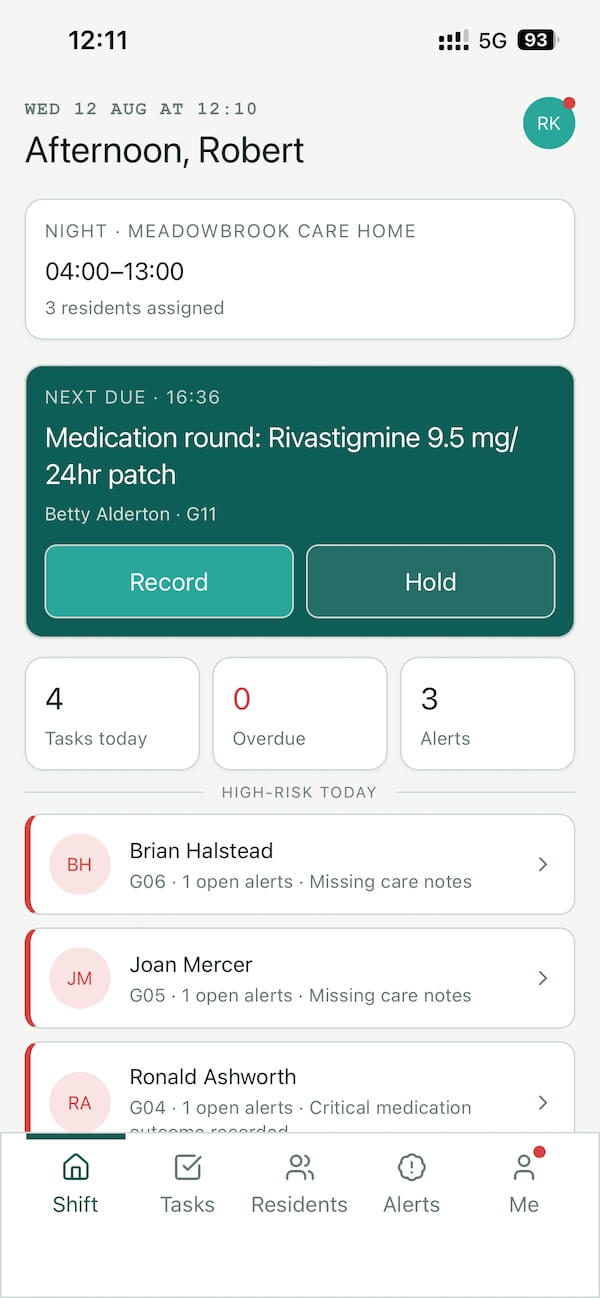
The caregiver app. Everything you need for the shift, in your hand.
The parts of a shift that get in the way of care.
If these sound like your day, Granily was built to take them off your plate.
Writing everything up at the end
You carry the day in your head and write it up when the shift ends, tired, when the details have already started to blur.
Starting a shift in the dark
You come on and spend the first stretch working out what happened before, chasing whoever was on to fill in the gaps.
Walking to the office to log things
Something happens in a resident’s room, and recording it means leaving them to find a free computer down the hall.
Paper that goes missing
Notes on paper get lost, smudged, or left in the wrong folder, and then the next shift cannot find what they need.
Repeating yourself
You write the same thing in two places, or say it at handover and write it again, because nothing is joined up.
Being pinged on your day off
Work apps that do not know your hours, sending you alerts and messages when you are meant to be off and resting.
Most homes we surveyed spend three or more hours a week on incident and accident reporting. Granily lets you log it from the room you are in, in one screen, next to the right resident.
See how it worksBuilt around the way you already work.
Everything you need for the shift is on the app, and the things you do most are the quickest.
Your residents and the last shift
Open the app at the start of the shift and see your residents, their key flags, the most important instructions from their care plans, and what happened on the shift before yours.
Write a note in seconds
Record what you did against the right resident in a few taps, so nothing waits until the end of the shift to be written down.
Record medications as you give them
See what is due, record each dose as it is given, and know at a glance whether anything has been missed.
Report from where you stand
Log an incident or a concern from the room you are in, in one screen, next to the resident it relates to.
See what is due on your shift
Your tasks and checks for the shift are in one list, so you are not relying on memory or a note on a scrap of paper.
Notifications that respect your time
Alerts follow your shift hours by default, so the app keeps quiet on your day off instead of pulling you back to work.
It is the floor side of the same system the office uses, so what you write is there for the next shift right away.
See everything Granily doesSimple enough to pick up on your first shift.
The app is built around the actions you do most, so the things that come up every shift are the quickest to do. Most caregivers are comfortable with it within a few shifts, and there are short guides and videos if you want them.
If you would rather work on a computer or tablet than a phone, you can. The web app has everything too, so you are not forced onto the mobile app if it does not suit you.
Your shift, before and after.
You write the day up at the end, when you are tired.
You log as you go, in a few taps, at the point of care.
You start the shift chasing what happened before.
You open the app and see the last handover straight away.
You leave the room to find a computer to log something.
You report from where you are standing, next to the resident.
Notes on paper get lost or end up in the wrong folder.
Notes are against the right resident, there for the next shift.
You write the same thing in two places.
You record it once, and it is where everyone needs it.
Work apps ping you on your day off.
Alerts follow your hours, so the app is quiet when you are off.
Questions care staff ask.
Think this would make your shifts easier? Show it to your manager.
Send this to your managerGranily is decided by your manager, but built for you.
If your home does not use Granily yet, the best thing you can do is put it in front of the person who decides. Point them to a quick call where they can see how it works.
- How your home runs today and where the time goes.
- Where Granily would fit, shown against your actual way of working.
- What is on the roadmap and how your needs could shape it.
- Your questions, answered directly by the person who builds the product.